Mp3 To Text

Choose your workflow

mp3 to text vs transcribe: Find the right path for your recording

The mp3 to text vs transcribe choice is less about competing formats than about the result you need. Start with a readable draft when you need the words; plan a review pass when accuracy, speakers, or publication matter.

Verdict first: choose by the finished document

Use mp3 to text for a working transcript you can search and edit. Treat transcription as the broader job when the text must be checked against the recording and prepared for someone else to read.

Dimension by dimension: know the limits

Neither label guarantees a polished transcript. Recording quality, the intended reader, and the amount of checking you can do matter more than the wording on a tool.

A draft cannot verify its own accuracy

An mp3 to text result may contain plausible-looking mistakes in names, figures, or unfamiliar terms. Readable sentences are not proof that every word matches the audio.

Workaround

Replay the relevant passages and check consequential details before quoting or publishing them.

Speaker labels need scrutiny

Overlapping voices, interruptions, and similar-sounding speakers can make attribution uncertain. An unlabeled transcript may be sufficient for a private note but not for interview excerpts.

Workaround

Mark speakers against the recording and flag any passage you cannot confidently attribute.

No text restores missing sound

If speech is clipped, muffled, or drowned out, an mp3 to text draft cannot reconstruct what was never audible. Guessing can make a transcript more misleading than an explicit gap.

Workaround

Use the clearest available recording and mark uncertain words rather than silently filling them in.

Confidentiality needs a separate decision

The words “online” and “transcribe” do not establish whether a particular recording is appropriate to upload. Sensitive material calls for a deliberate handling choice.

Workaround

Check the service's current file-handling terms and obtain any required permission before sharing audio.

Dimension by dimension: match effort to purpose

A useful comparison follows the work after conversion, not just the first text that appears.

  1. 1

    Define the output

    For a quick search, summary, or personal reference, a rough mp3 to text draft may be enough. For a quotation, record, or handoff, decide whether you also need speaker names, timestamps, or a consistent style.

  2. 2

    Check the difficult audio

    Listen again where speakers overlap, vocabulary is specialized, or a number changes the meaning. The more consequential the document, the more time to reserve for verification.

  3. 3

    Prepare the handoff

    Keep uncertain passages visible until resolved, then add the formatting your reader needs. A transcription workflow is complete when someone can use the text responsibly, not merely when the audio has become words.

Dimension by dimension: draft versus deliverable

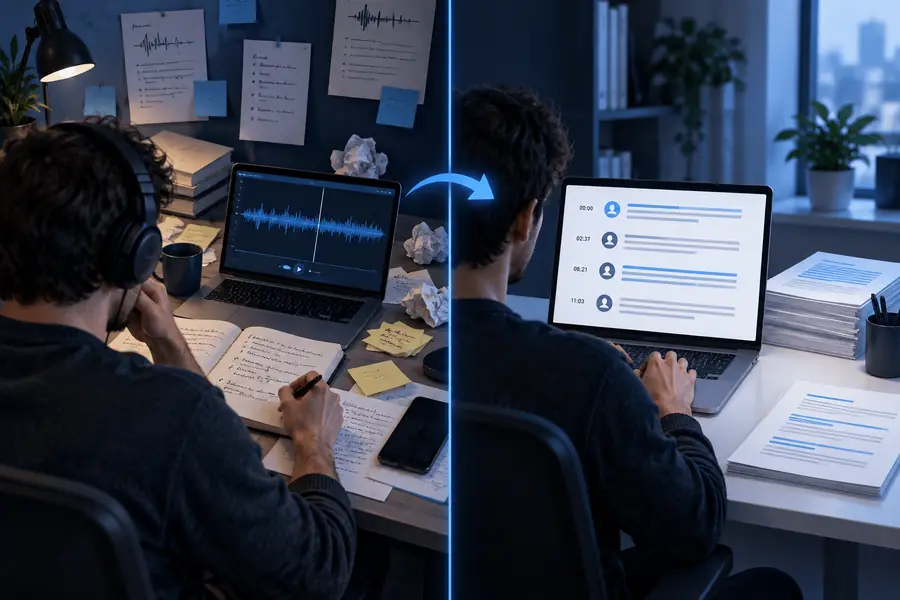
Think of the two sides as stages of work rather than a guaranteed before-and-after result from any single tool.

Illustration accompanying the MP3-to-text and transcription comparison Working text
Illustration accompanying an editable Word-document workflow Reviewed document
The first pass helps you find what was said. A deliverable may also need corrections, speaker attribution, and formatting; those steps should be checked against the audio.

Who each suits: four practical decisions

Choose the lightest workflow that meets your actual use case, then spend review time where an error would matter.

Student reviewing a lecture

You want to locate a topic in a recording and make your own study notes. A working transcript can be useful even before every sentence is corrected.

Search the draft, then replay passages you plan to rely on.

mp3 to text free

Interviewer preparing a quote

You need words you can attribute to a person. Speaker changes and exact phrasing matter more than getting an immediate block of text.

Generate a draft, then verify each proposed quotation against the recording.

mp3 to text examples free

Researcher organizing voice notes

You have several ideas to sort and want editable text without treating every first-pass sentence as final.

Use the transcript as source material and review key terminology before sharing findings.

how to use mp3 to text online

Coordinator assembling meeting notes

You need a document colleagues can edit, with decisions and names checked before circulation.

Review the transcript, separate speakers where needed, and move the corrected copy into a document.

mp3 to word

Who each suits: compare the work side by side

Here, “mp3 to text” means producing a first-pass text draft; “transcribe” means completing the wider task of making that draft fit its intended use. The terms can overlap in everyday speech.

MP3-to-text draft
Reviewed transcription

Primary goal

MP3-to-text draft

Get searchable words from an MP3 recording.

Reviewed transcription

Produce text suitable for a defined reader or purpose.

Starting point

MP3-to-text draft

An audio file and a need to find or reuse its spoken content.

Reviewed transcription

An audio file plus expectations for accuracy and presentation.

First output

MP3-to-text draft

A working text version that may need corrections.

Reviewed transcription

A draft that still needs to be checked before delivery.

Names and figures

MP3-to-text draft

May require a targeted listen-back.

Reviewed transcription

Should be verified wherever mistakes would affect the reader.

Speakers

MP3-to-text draft

Labels may be unnecessary for private, single-speaker notes.

Reviewed transcription

Attribution may be essential for interviews or meetings.

Formatting

MP3-to-text draft

Plain text may be sufficient for searching and note-taking.

Reviewed transcription

Paragraphs, labels, or timestamps depend on the brief.

Best stopping point

MP3-to-text draft

When the draft answers your immediate question.

Reviewed transcription

When the checked document is ready for its intended audience.

Migration path: start with text, finish with review

Turn your recording into a useful first draft

Begin with mp3 to text if you need to get the spoken material onto the page. Then decide what the document is for: search it as a private reference, or listen back, correct uncertain passages, and format it before sharing. You do not need a separate philosophy for each label—just a clear standard for when the work is finished.

Convert an MP3
  • Keep the original audio available for checking.
  • Verify quotations, names, and important figures.
  • Match the final formatting to the reader.

Comparison FAQ

In everyday use, the phrases often describe the same basic action: turning recorded speech into written words. In this comparison, mp3 to text refers to the first-pass output, while transcribing includes any checking and preparation needed for the intended use.

A draft is a useful starting point for finding topics and possible quotes. If you will attribute statements or publish excerpts, replay those passages, confirm who spoke, and correct the wording before sharing.

That depends on the recording and the consequences of an error. A rough draft may serve personal searching, but names, figures, specialist terms, and unclear speech deserve review when others will rely on the text.

Not always. A single-speaker voice note may need neither, while a meeting record or interview may benefit from speaker attribution and locations you can use to check the audio.

Replay the difficult passage with the best available audio and avoid presenting a guess as a confirmed word. If the speech remains unclear, mark that uncertainty in the working transcript.

Transcribe MP3
Transcribe MP3